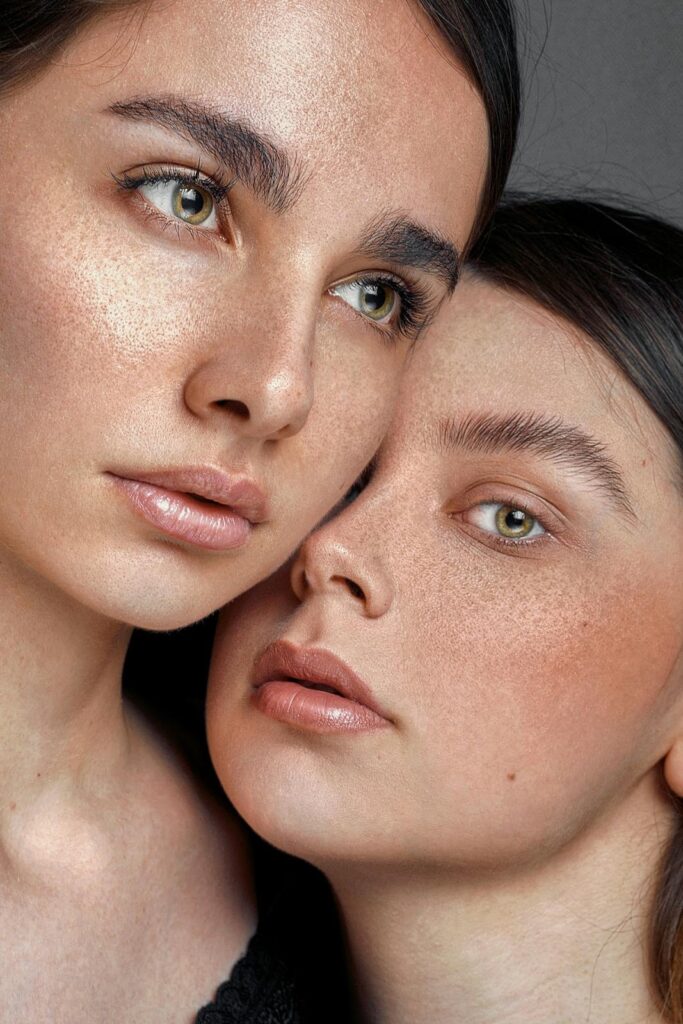
Getting skin tones to look amazing in photos isn't easy. I've seen countless photographers struggle with this, myself included. One minute, your subject looks glowing and natural, the next, they're either washed out or oddly orange. It's frustrating.
But here's the thing: capturing beautiful skin tones doesn't have to be this mysterious art form that only pros can master. Sure, there's technique involved. But with a few solid strategies, you can make anyone's skin look radiant and natural in your shots.
Whether you're shooting your friend's headshots or trying to nail that perfect portrait, these tips will help you get there. No fancy equipment required—just some know-how and practice.
Tip 1: Master the Art of Lighting
Lighting makes or breaks your photo. Period.
Natural light is your best friend here, but not just any natural light. That harsh noon sun? Skip it. You'll end up with unflattering shadows under the eyes and an overall look that's just... not great.
Instead, shoot during golden hour—about an hour after sunrise or before sunset. The light's softer, warmer, and incredibly forgiving. I've watched photographers transform their work just by changing when they shoot.
Position your subject so light hits them from the side or slightly behind. Then grab a reflector (or even a white poster board) to bounce some light back onto their face. This fills in those shadows while keeping that natural glow.
Don't be afraid to move around and try different angles. Sometimes the best light is right behind you, sometimes it's streaming through a window at 3 PM. Every situation's different.
Tip 2: Get Your Camera Settings Right
Your camera settings matter more than you might think. And honestly, auto mode won't cut it here.
Start with white balance. This is huge for skin tones. Auto white balance works okay, but manually setting it gives you way more control. Shooting indoors under tungsten lights? Set it to tungsten. Outside in the shade? Use the shade setting.
Keep your ISO low—around 100-400 if possible. Higher ISOs create noise, and that grain doesn't do skin any favors.
For aperture, try something wide like f/2.8 or f/1.8. You'll get that nice background blur while keeping your subject sharp. Plus, it helps isolate them from distracting backgrounds.
One thing I learned the hard way: always shoot in RAW if you can. You'll thank yourself later when you're editing.
Tip 3: Post-Processing Can Work Magic
Editing isn't cheating—it's part of the process. Even the best photographers edit their work.
Lightroom and Photoshop are industry standards for good reason. In Lightroom, head straight to the HSL panel. Those orange and yellow sliders are your skin tone best friends. Subtle adjustments here can warm up or cool down skin tones perfectly.
Don't go overboard, though. I've seen too many photos where someone cranked the clarity to 100 and the subject looks like they're made of plastic. Keep it natural.
Try adding a gentle vignette to draw attention to your subject's face. Slightly boost the highlights in just the skin areas to create a subtle glow that looks amazing.
Remember: enhance, don't transform. Your goal is to make people look like the best version of themselves, not someone else entirely.
Tip 4: Smart Use of Accessories and Prep
Small details make a big difference to the aesthetics of portrait photography. Light-colored clothing reflects light back onto the face—it's like having a built-in reflector. Dark colors absorb light and can make skin look dull.
Background choice matters too. Neutral tones or soft pastels make skin pop without competing for attention. I love shooting against cream walls or natural wood—they're flattering for almost everyone.
For props, think textures that complement skin. Soft fabrics, fresh flowers, and natural elements like leaves or stone. They add visual interest without overwhelming your subject.
Here's something many photographers overlook: prep work. Quality self-tanners can help even out skin tone before the shoot even starts. It's one less thing to fix in post.
The Bottom Line
Getting great skin tones isn't about having the most expensive gear or knowing every Photoshop trick. It's about understanding light, being intentional with your settings, and knowing when to enhance what you've captured.
Start with good light. Get your camera settings dialed in. Edit with restraint. Pay attention to the details. Most importantly? Practice. Take photos of friends, family, even yourself. Try these techniques in different situations. You'll start seeing what works and what doesn't pretty quickly.
Your portraits will improve, guaranteed. And once you nail this stuff, you'll wonder why it seemed so complicated in the first place.